How to sign a PDF on your phone
Updated 10/14/2026
Someone sent you a contract, lease or permission form to sign, and you don’t have a printer or computer handy? Your phone is all you need. Here’s how to sign a PDF with your finger in under a minute, without installing an app.
What you need
- The PDF to sign, saved on your phone (from an email, a messaging app or your files).
- A web browser: Safari, Chrome, Firefox or Samsung Internet.
- That’s it: no account to create and no app to install.
Sign the PDF step by step
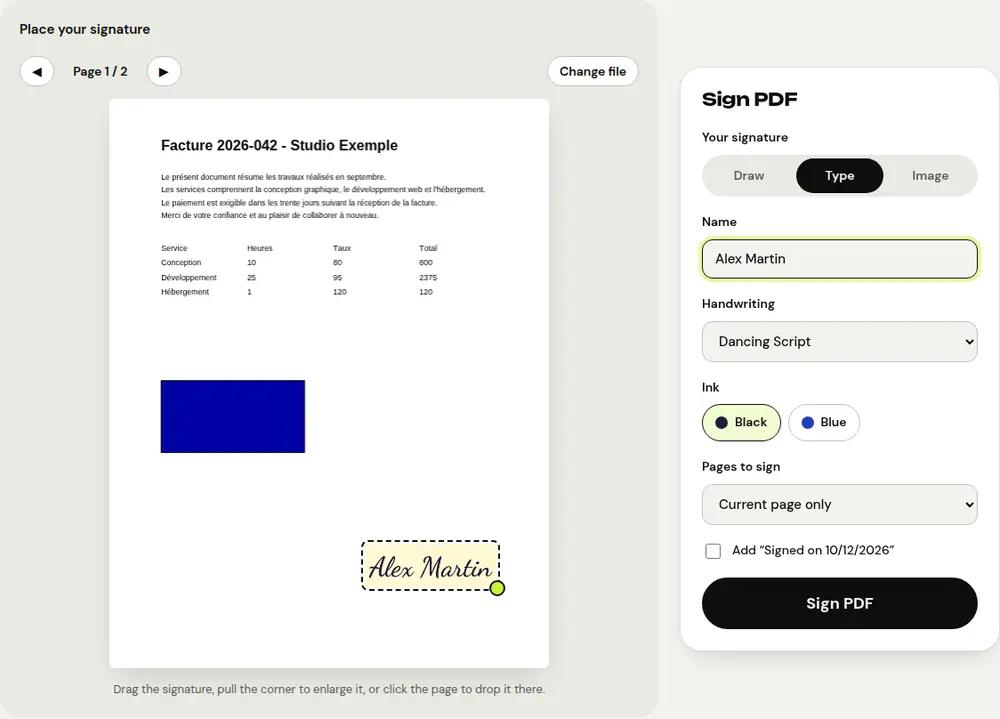
- Open the “Sign PDF” tool in your phone’s browser and select the document.
- Under “Your signature”, draw your signature with your finger. You can also type your name and pick a handwriting style.
- Choose black or blue ink.
- Drag the signature where you want it on the page, and pull its corner to resize it.
- Choose which pages to sign (the current page, the last page or all pages), then tap “Sign PDF”.
- Download the signed document and send it back by email or messaging app.
Tips for a good signature
- Turn your phone sideways to have more room to sign.
- Use a stylus if you have one: the stroke will look more natural.
- To reproduce your real signature, sign on a blank sheet of paper, take a photo of it and choose “Image”: PDFRoll can remove the white background.
- Check the option that adds today’s date under the signature if the document asks for it.
Fill in the document before signing
If the PDF has fields to fill in (name, address, checkboxes), use the “Fill in a PDF form” tool first. If it has no fields, the “Edit PDF text” tool lets you add text anywhere on the page. Then sign the completed document.
Is this signature valid?
It’s a visual signature, equivalent to a scanned handwritten signature. It’s accepted for many everyday documents: quotes, purchase orders, parental consent forms, leases, depending on what the recipient accepts. Some documents, however, require a certified electronic signature linked to your identity. If in doubt, ask the recipient.
Frequently asked questions
Is my signature stored anywhere?
No. It only exists in your browser while you’re using it: nothing is sent or saved.
Can I sign a PDF I received by email on my iPhone?
Yes: save the attachment to Files, then open it from the “Sign PDF” tool in Safari.
Do I have to pay to sign a PDF?
No, PDFRoll is free, with no sign-up and no watermark.
More guides
- How to reduce PDF size to send by email
- How to turn photos into a single PDF
- How to edit a PDF for free, without Acrobat
- How to merge multiple PDFs into one file
- How to password protect a PDF
- How to make a scanned PDF searchable with OCR
- How to convert a PDF to Excel without retyping the numbers
- How to translate a PDF
- How to properly redact a PDF
- How to convert a PowerPoint to PDF to send it
- How to separate the pages of a PDF
- How to convert a PDF to an editable Word document
- How to convert a Word document to PDF
- How to fill in a PDF form without printing it
- How to reduce a PDF below a maximum size
- How to rotate a PDF and save the rotation
- How to convert a PDF to a JPG image
- How to add page numbers to a PDF
- How to add a watermark to a PDF
- Free Smallpdf alternative: an honest comparison
- Free iLovePDF alternative: an honest comparison
- Free alternative to Adobe Acrobat online