How to convert a Word document to PDF
Updated 10/14/2026
A résumé, a cover letter or an invoice is better sent as a PDF: the document looks the same on every device and can’t be changed by accident. If you don’t have Word handy, or you’re on a phone, PDFRoll converts your file right in your browser.
Convert a Word file to PDF
- Open “Word to PDF” and select your .docx document.
- Click “Convert to PDF”.
- Download the resulting PDF.
The document isn’t sent anywhere: the conversion happens on your device, which matters for a résumé or a document with personal information.
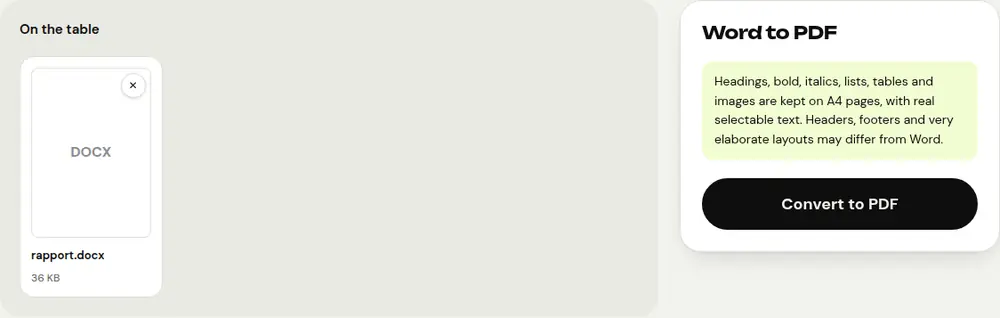
What gets preserved
- Headings, bold and italics.
- Bulleted and numbered lists.
- Tables and images.
- Real text that you can select and search in the PDF.
Pages are A4 size. Headers, footers and very elaborate layouts may differ slightly from what you see in Word. Check the result before sending it.
My file is a .doc, not a .docx
“Word to PDF” accepts .docx files, Word’s format since 2007. For an older .doc file, open it in Word, LibreOffice or Google Docs, save it as .docx, then convert it.
After the conversion
- Several documents to send together, like a résumé and a cover letter: combine them with “Merge PDF”.
- A PDF too large for an email or an online form: shrink it with “Compress PDF”.
- A confidential document: add a password with “Protect PDF”.
Frequently asked questions
Do I need Word installed?
No. PDFRoll reads the .docx file right in your browser, on a computer or a phone.
Is my document uploaded online?
No. Everything happens on your device; the file is never uploaded.
Will the text in the PDF be selectable?
Yes. The PDF contains real text that you can copy and search, not an image of the page.
Why does the layout change slightly?
Some Word-specific elements, such as headers, footers or floating text boxes, aren’t always reproduced exactly. The content itself is preserved.
More guides
- How to reduce PDF size to send by email
- How to sign a PDF on your phone
- How to turn photos into a single PDF
- How to edit a PDF for free, without Acrobat
- How to merge multiple PDFs into one file
- How to password protect a PDF
- How to make a scanned PDF searchable with OCR
- How to convert a PDF to Excel without retyping the numbers
- How to translate a PDF
- How to properly redact a PDF
- How to convert a PowerPoint to PDF to send it
- How to separate the pages of a PDF
- How to convert a PDF to an editable Word document
- How to fill in a PDF form without printing it
- How to reduce a PDF below a maximum size
- How to rotate a PDF and save the rotation
- How to convert a PDF to a JPG image
- How to add page numbers to a PDF
- How to add a watermark to a PDF
- Free Smallpdf alternative: an honest comparison
- Free iLovePDF alternative: an honest comparison
- Free alternative to Adobe Acrobat online