How to reduce PDF size to send by email
Updated 10/14/2026
“Attachment too large”: it’s a frustrating message when you need to send a file quickly. The good news is that a PDF can almost always be made smaller in seconds. This guide explains how, what size to aim for, and what to do if the file is still too big.
What’s the maximum attachment size?
Every service has its own limit, and it often counts all the files in the message:
- Gmail: about 25 MB per message.
- Outlook: about 20 MB per message.
- Online forms, government portals, job applications: often 2 to 5 MB per document, sometimes less.
If you don’t know the limit, aim for under 5 MB: the file will go through almost anywhere and open quickly, even on a phone.
Reduce PDF size in 3 steps
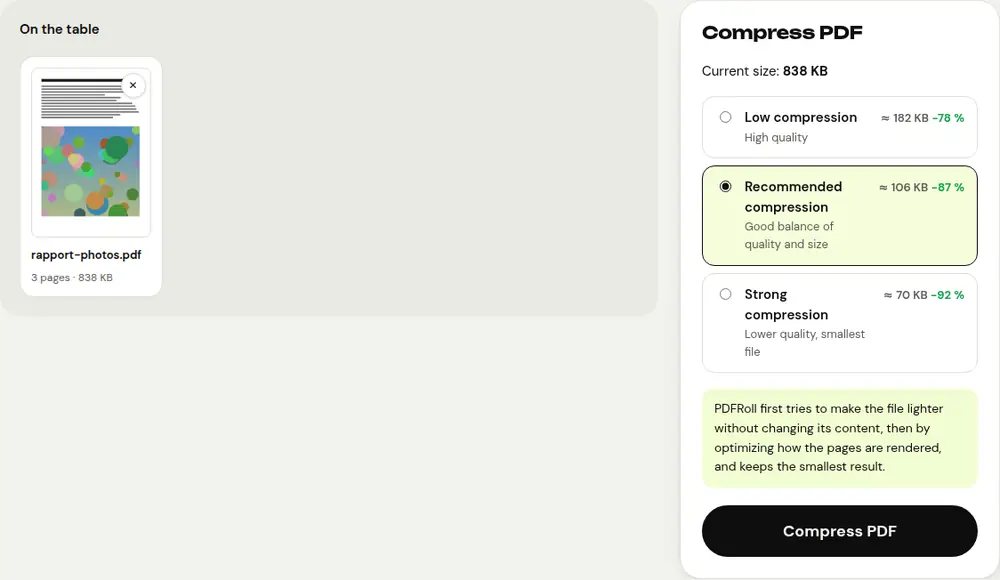
- Open the “Compress PDF” tool and select your file.
- Compare the estimated sizes for each level: low, recommended or strong. For documents of 30 pages or fewer, they appear before you even start compressing.
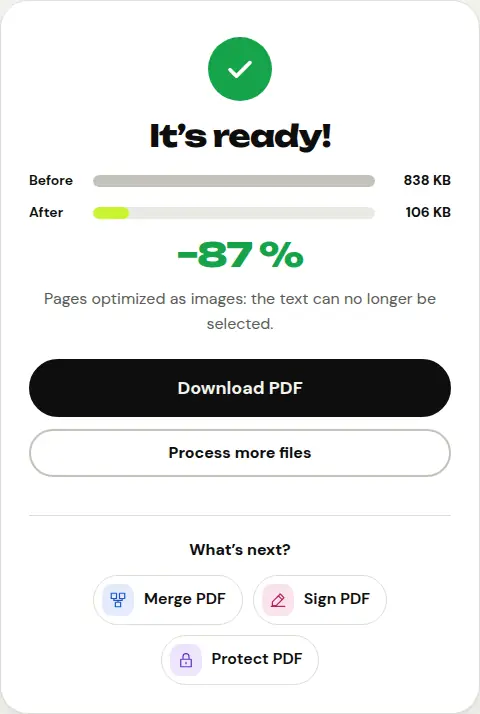
- Click “Compress PDF”, check the size before and after, then download the smaller file.
PDFRoll first tries to shrink the file without changing any of its content. If that isn’t enough, it optimizes how the pages are rendered and automatically keeps the smallest result.
Why are some PDFs so large?
It’s almost always the images: pages scanned at high resolution, photos taken with a phone, illustrations that were never optimized. A ten-page scanned document can exceed 20 MB. A PDF created straight from a word processor, on the other hand, is usually already small.
That’s why compression works best on scans and photo-heavy documents.
File still too large?
- Try the “strong” level: image quality drops slightly, but the text stays readable.
- Cut the document into several parts with the “Split PDF” tool, then send them in separate emails.
- If the PDF was made from photos, recreate it with “JPG to PDF” using smaller images, then compress it.
- For a very large file, a share link (Google Drive, OneDrive, Dropbox) is still the best option.
What about privacy?
People often compress sensitive documents: bank statements, pay slips, medical records. With PDFRoll, compression is done by your browser and the file never leaves your device, unlike most online services, which receive it on their servers.
Frequently asked questions
Will compression damage my document?
With lossless compression, nothing changes on screen. With stronger compression, images lose a little sharpness, but the text stays readable. PDFRoll tells you which method was used.
Can I compress a PDF on my phone?
Yes, right in your phone’s browser, with no app to install.
Why is my PDF barely getting smaller?
If it’s mostly text, it’s probably already optimized. PDFRoll lets you know and gives you back the original file.
More guides
- How to sign a PDF on your phone
- How to turn photos into a single PDF
- How to edit a PDF for free, without Acrobat
- How to merge multiple PDFs into one file
- How to password protect a PDF
- How to make a scanned PDF searchable with OCR
- How to convert a PDF to Excel without retyping the numbers
- How to translate a PDF
- How to properly redact a PDF
- How to convert a PowerPoint to PDF to send it
- How to separate the pages of a PDF
- How to convert a PDF to an editable Word document
- How to convert a Word document to PDF
- How to fill in a PDF form without printing it
- How to reduce a PDF below a maximum size
- How to rotate a PDF and save the rotation
- How to convert a PDF to a JPG image
- How to add page numbers to a PDF
- How to add a watermark to a PDF
- Free Smallpdf alternative: an honest comparison
- Free iLovePDF alternative: an honest comparison
- Free alternative to Adobe Acrobat online